
At a Glance
Key Differences in HubSpot's New Workflow Actions for Associations
When using HubSpot's actions in workflows, it's important to understand the difference between applying association labels, creating associations, and updating association labels.
In the following examples, I will be using an example company, ABC Company, and three example contacts, Alice, Bob, and Charlie.
Creating Associations
Links records that were not previously connected. This establishes a new relationship between two records in HubSpot.
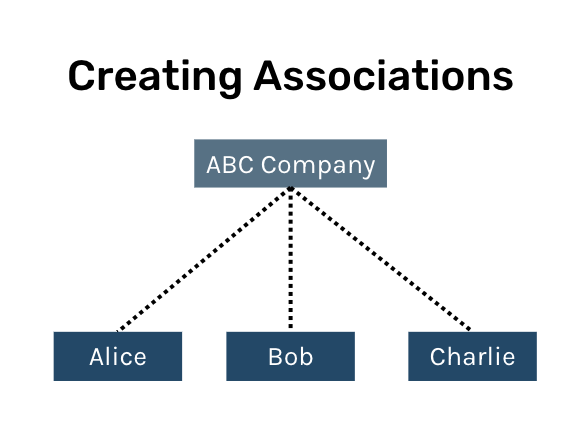
Before creating an association between Alice, Bob, Charlie, and ABC Company, each were separate records with no connection. After creating these associations, there is a company-to-contact connection which establishes a relationship between the records.
Applying Association Labels
After creating associations, you can apply labels to specify the nature of the relationships. This adds context to the existing association.
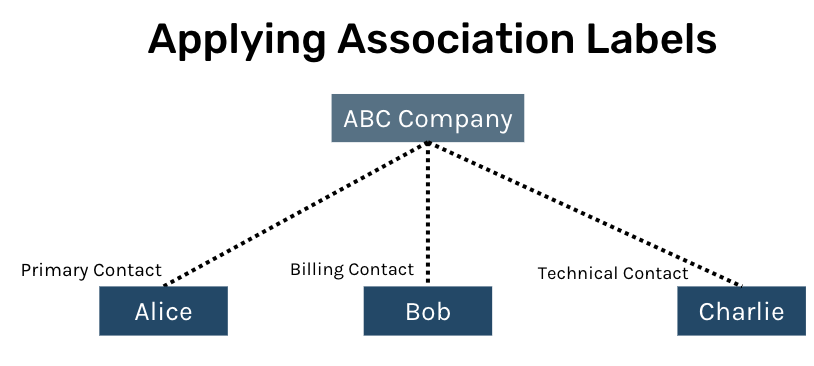
In this example, labels indicate the contacts specific roles within ABC Company.
Updating Association Labels
Modifies the existing labels to reflect changes in the nature of the relationship between records.
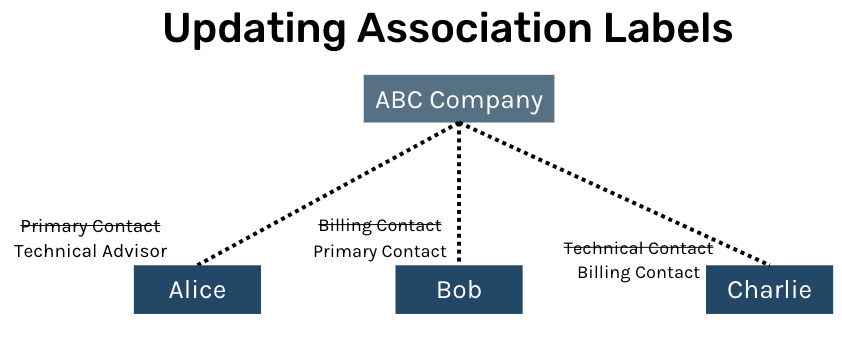
In this example, each contact had a position change within ABC Company so we can update the labels to reflect the position change.