At a Glance
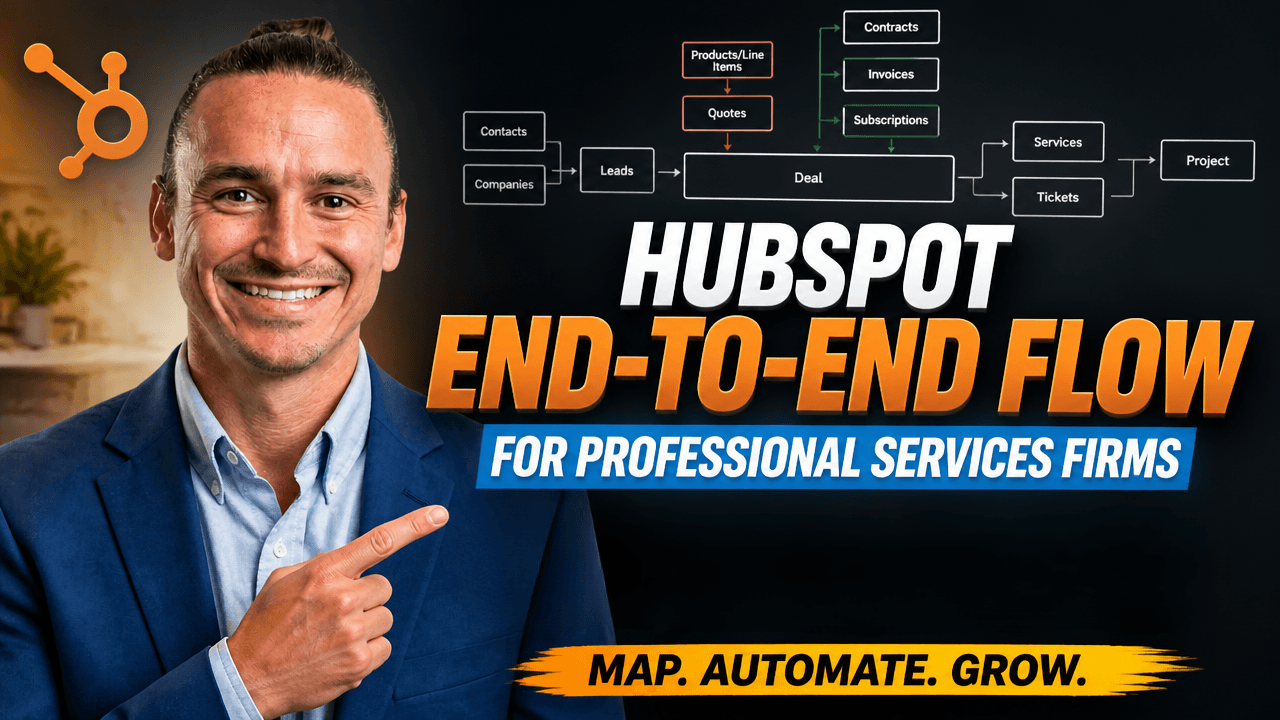
Every HubSpot object in the order data actually flows through a professional services firm: Contact, Lead, Deal, Quote, Contract, Service, Project.
HubSpot's end-to-end flow for a professional services firm runs from Contact and Company at the front, through the Lead object, into Deals with Quotes and Line Items, then into Subscriptions, Invoices, and Contracts at close, and finishes with Services and Projects for delivery. Every object stays tied back to the original Contact and Company records.
Watch the full walkthrough
Why this matters for agencies and consultancies on HubSpot
The lead-to-project flow inside HubSpot has changed a lot in 2025 and 2026. New objects (Leads, Contracts, Services, Projects) replaced workarounds that agencies and consultancies used to build with custom properties and lifecycle stage hacks. For any professional services firm above $10M in annual revenue, the modern setup is dramatically simpler than what most teams are still running.
This walkthrough maps the full flow object by object, in the same order data actually moves through the system. Front of funnel to delivery.
Front of funnel: Contacts and Companies
Every HubSpot record starts as either a Contact or a Company. A Contact is a person. A Company is the business they belong to. Form submissions, integrations, manual entry, marketing automation, paid lead capture: all of it creates one or both.
Both objects stay alive through the entire customer lifecycle. Every other object created later ties back to them.
For most professional services firms, Companies are the primary book-of-business record because you sell to organizations. Contacts represent the people inside those companies you actually talk to.
The Lead object: why agencies should be using it
HubSpot's Lead object sits between Contact and Deal. It's where a sales rep tracks early pursuit before a real opportunity exists.
The old way tracked everything through the Contact or Company using lifecycle stages and lead status. That works, but it has limits. A single contact at one company can only carry one lifecycle stage at a time, which makes it hard to pursue multiple opportunities in parallel.
The new way creates a Lead for each opportunity you're pursuing. One contact at an agency can have three open Leads at once: one for the original website project, one for ongoing SEO, one for an annual maintenance retainer. Each Lead has its own pipeline stage, its own owner, and its own outcome.
Concrete example. You close a one-off website build. Six months in, you spot an expansion opportunity for SEO work. You create a new Lead, tied to the same Contact and Company, and pursue it as its own motion. Win or lose, the original deal stays clean. The new opportunity gets its own history.
Lead status auto-progresses through pipeline stages. When a Lead reaches qualified, HubSpot prompts the rep to create a Deal. That handoff is where the sales cycle officially begins.
From Lead to Deal: the qualification handoff
A qualified Lead becomes a Deal. When the rep moves a Lead into the qualified stage, HubSpot pops a form to capture deal-level data. The Lead closes out as won-into-deal. The new Deal stays associated with the original Contact and Company.
Critically, every call, email, and note logged on the Lead remains visible on the Deal. No history is lost in the handoff.
From this point forward, the sales motion runs through the Deal: proposal, demo, pricing, negotiation, close.
Inside the Deal: Quotes, Products, and Line Items
While a Deal is active, three more objects come into play.
Products live in a central library. They're the canonical version of what you sell: a website build, a discovery sprint, an SEO retainer.
Line Items are what a Product becomes when it's attached to a Deal or Quote. A Line Item is a copy of the Product scoped to that specific Deal, which means you can customize price, quantity, term, or description for the deal without affecting the master Product record.
Quotes pull Line Items from the Deal into a customer-facing document. As of June 2026, HubSpot's quote builder includes AI-assisted generation, conditional rules, and template logic. Useful if you generate dozens of quotes a month.
When a Deal closes: Subscriptions, Invoices, and Contracts
When a Quote is signed and the Deal moves to closed-won, three things can happen depending on your payment setup.
Subscriptions track recurring revenue if you're billing through HubSpot. A $5K/month retainer creates a subscription that bills automatically each cycle.
Invoices are created for each payment due. One-time payments produce a single Invoice. Subscriptions produce one Invoice per billing cycle. Invoices also sync in from external tools like QuickBooks, NetSuite, and Stripe, so the data stays consistent across systems.
Contracts are the most consequential addition for professional services. The Contracts object tracks total contract value (TCV), monthly recurring revenue (MRR), and the underlying Line Items for the duration of the customer relationship. If a customer adds line items, upgrades, downgrades, or churns, the Contract record updates and your MRR and TCV move accordingly.
The Contracts object is in beta as of June 2026. It eliminates the workaround most professional services firms have been running for years: creating renewal Deals just to keep MRR tracking accurate.
To make a change to an active contract, you click into the Contract record, generate a change order, modify the line items, send a new quote, and tie it either to the original Deal or to a fresh Deal if you're tracking an upsell as separate motion.
From close to delivery: Tickets vs. Services
Once a Deal closes won, work transitions to delivery. There are two HubSpot objects to track it.
Tickets were the original answer: a support-style object that agencies repurposed for onboarding and project tracking. Tickets still belong with customer support work: bug reports, customer questions, issue tracking.
Services is the newer object built specifically for professional services delivery. Each Service record represents one ongoing engagement: onboarding, monthly retainer execution, project delivery, customer success motion.
Service records get assigned to delivery team members. All meetings, calls, and emails tied to the customer post-close get logged against the Service record. That data flows back into HubSpot, which means customer health metrics, expansion signals, and renewal risk all live in one place. Your CS team can spot an upsell opportunity, create a new Deal directly from the Service record, and the sales motion picks up from there with full history visible.
Project execution inside HubSpot
The Projects object closes the loop. Projects is HubSpot's lightweight project management layer: Gantt-style milestones, subtasks, owner assignments, due dates.
A Project ties to a Service record. Once onboarding kicks off, a Project gets created (often automatically) and the delivery team works through it.
Projects won't replace ClickUp, Asana, or Jira for complex builds with deep task hierarchies and specialized workflows. For professional services firms with well-defined, productized deliverables, Projects lets you consolidate inside HubSpot instead of operating across multiple tools.
The full picture: every object, end to end
End to end, the flow for a professional services firm on HubSpot runs like this:
- Contact and Company created at front of funnel
- Lead created and tied back to the Contact and Company
- Lead qualified, Deal created with the same associations preserved
- Products attached, Line Items generated, Quote sent
- Quote signed, Subscriptions, Invoices, and Contracts generated at close
- Service record created for onboarding and ongoing delivery
- Project record created for actual task execution
Every object stays tied back to the Contact and Company at the front. The CS lead sees an upsell opportunity on a delivery call, creates a new Deal directly from the Service record, and the whole sales motion picks up from there.
ERP sync: where NetSuite, QuickBooks, and Stripe fit in
If you're running an ERP alongside HubSpot, the modern setup syncs the financial side end to end. ERP objects (Sales Orders, Customers, Invoices, Items) map to HubSpot objects (Deals, Companies, Invoices, Line Items).
This requires a deliberate mapping pass. The default integration won't get you there on its own. The mapping has to reflect how your finance team actually operates: which ERP entity corresponds to which HubSpot object, which fields stay synced, which direction the data flows. Done well, both systems stay consistent. The CRO sees a full picture inside HubSpot. The CFO sees the same picture inside the ERP.
Why this matters for $10M+ agencies and consultancies
For most professional services firms above $10M in revenue, the operating bottleneck is the system underneath the numbers. Reps update one tool. Finance lives in another. CS operates from a third. The forecast comes off data nobody fully trusts.
The end-to-end HubSpot setup above closes that gap. One platform. One source of truth. Every object connected. Every transition automated where it can be.
If you recognize gaps in your own operation (duplicate tools, inconsistent definitions, MRR tracked through workarounds, project status that lives in someone's head), the modern HubSpot setup solves it without requiring a platform change.
Frequently asked questions
Should I use the Lead object if I'm already using Contacts and lifecycle stages?
Yes, for any professional services firm pursuing multiple opportunities per account. The Lead object lets you track parallel sales motions against the same Contact and Company. Lifecycle stages carry only one value at a time, which becomes a bottleneck the moment you're chasing more than one opportunity at the same account.
When should I use Tickets vs. Services in HubSpot?
Tickets are for customer support: bug reports, requests, issues. Services are for delivery: onboarding, retainer work, project execution. If the work has a defined scope and a delivery owner, use Services. If it's reactive support driven by inbound issues, use Tickets.
Do HubSpot Contracts replace the need to create renewal Deals?
For tracking MRR and TCV, yes. The Contracts object updates automatically when line items change, so you no longer need a fresh renewal Deal each year just to keep MRR accurate. You'll still create new Deals for genuine expansion opportunities (separate scope, separate sales motion), but the renewal-tracking workaround is gone.
Can I run my actual project management in HubSpot Projects?
For straightforward delivery with Gantt-style milestones and clear owners, yes. For complex builds with deep task hierarchies, dependencies across teams, and specialized workflows, keep using ClickUp, Asana, or Jira. HubSpot Projects works best for firms with productized, well-defined deliverables.
How does this setup connect to my ERP?
HubSpot syncs to most ERPs (NetSuite, QuickBooks, Sage) through native integrations or middleware. The setup requires a deliberate object mapping pass: which ERP entity corresponds to which HubSpot object, which fields stay synced, which direction the data flows. Done well, both systems stay consistent.
How long does it take to set up the full end-to-end flow?
For most professional services firms above $10M in revenue, the full structural rebuild runs sprint by sprint against the RevOps Maturity Model. The first sprint alone takes four to six months. Full operating change follows once a complete revenue cycle has run through the new system.
Next step
If you're a professional services firm doing $10M+ in revenue and recognized gaps in your own end-to-end flow, that's the work we do. We rebuild the system underneath your number (GTM, data, forecasting, comp, cadence, and reporting) so HubSpot operates as the spine of your business instead of a tool people work around.
Schedule a conversation with our Practice Lead →
Or read more about how we approach the work: the four-layer pattern we see in every $10M+ HubSpot operation · PE operating partner work.