At a Glance
"Complete guide to building lead scoring models in HubSpot. Prioritize prospects that convert.
The Complete Guide to Lead Scoring in HubSpot for B2B Teams [2025]
TL;DR: Lead Scoring Essentials
- Lead scoring assigns numerical values to prospects based on fit and behavior, helping sales teams prioritize high-quality leads
- Two primary models: Fit Score (demographic/firmographic data) and Engagement Score (behavioral signals)
- Combined scoring uses weighted formulas (typically 75/25 or 60/40) to balance profile fit with active engagement
- MQL thresholds typically range from 50-80 points on a 100-point scale depending on sales capacity and close rates
- HubSpot's native lead scoring tool automates score calculation and lifecycle stage transitions based on your custom criteria
Table of Contents
- What is Lead Scoring?
- Types of Lead Scores: Lead vs. MQL
- Lead Scoring Models Explained
- What Data Should You Use for Lead Scoring?
- How to Build a Lead Scoring Model
- How to Set Your MQL Threshold
- How to Implement Lead Scoring in HubSpot
- Frequently Asked Questions
What is Lead Scoring?
Lead scoring is a systematic prioritization framework that ranks and categorizes prospects based on their likelihood to convert into paying customers. By assigning weighted values—both positive and negative—to specific customer attributes and behaviors, lead scoring creates a quantifiable metric that enables teams to focus their efforts where they matter most.
This methodology transforms subjective gut feelings into objective, data-backed decisions, ensuring that your sales team engages with the right prospects at the right time with the right message. Rather than treating all leads equally, lead scoring identifies which contacts deserve immediate sales attention and which require further nurturing.
The fundamental principle is simple: higher scores indicate more qualified leads. However, the scoring range itself matters far less than the quality and relevance of the attributes that comprise your model. A well-constructed lead scoring system helps sales teams increase productivity by up to 20% by eliminating time spent on unqualified prospects, according to Forrester Research.
Types of Lead Scores: Lead vs. MQL
Lead scoring frameworks can become complex as they mature, but the foundational structure is built on two primary lead categories: Leads and Marketing Qualified Leads (MQLs).
Understanding Lead Categories
Leads represent any contact in your database who has shown initial interest in your brand. This includes prospects who have visited your website, downloaded content, or otherwise engaged with your marketing materials. These contacts are in your system but haven't yet demonstrated sufficient buying intent to warrant sales outreach.
Marketing Qualified Leads (MQLs) are contacts who have demonstrated sufficient engagement and fit to warrant sales attention and outreach. These prospects have accumulated enough points through their profile characteristics and behaviors to signal genuine buying interest and alignment with your ideal customer profile.
How Lead Scoring Drives Lifecycle Progression
Lead scoring serves as the mechanism to systematically move contacts through lifecycle stages, from raw leads to MQLs. This transition happens automatically when contacts accumulate points by matching your ideal customer profile and demonstrating buying behaviors like requesting demos, visiting pricing pages, or engaging with sales content.
By quantifying readiness for sales outreach based on accumulated behavioral and demographic signals that indicate genuine buying intent, lead scoring removes guesswork from the qualification process. Sales teams receive only prospects who have crossed the defined threshold, ensuring their time focuses on conversations most likely to convert.
Lead Scoring Models Explained
A lead scoring model is the actual framework you use to assign numerical values to the attributes and behaviors you've defined as important. Most lead scoring models operate on a point-based scale, typically ranging from 0 to 100, though this can be customized based on your specific requirements.
The key principle is simple: a higher score indicates a more qualified lead. However, the scoring range itself matters far less than the quality and relevance of the attributes that comprise your model.
The Two Foundation Data Types
All effective lead scoring models are built on two fundamental data types: demographic data and behavioral data. Understanding how to leverage both creates a complete picture of lead quality.
Data TypeWhat It MeasuresWhy It MattersDemographic/FirmographicWho the prospect is (job title, company size, industry, location)Determines if they fit your ideal customer profileBehavioralWhat the prospect does (page visits, content downloads, email engagement)Indicates level of interest and buying intent
Most organizations use either a single combined score or separate scores for fit and engagement. The combined approach provides the most nuanced prioritization by weighing both dimensions according to your business model and sales process requirements.
What Data Should You Use for Lead Scoring?
Demographic and Firmographic Data
Demographic data encompasses information about your prospect and their organization. This includes firmographic attributes such as job title, industry, company size, location, annual revenue, number of employees, and technology stack.
These data points help you determine whether a prospect fits your ideal customer profile before investing time in outreach. For example, a law firm might have geographical preferences for certain cities or regions, which can be weighted heavily in their scoring model.
Key demographic attributes to consider:
- Job Title/Role: Decision-maker vs. influencer vs. end user
- Industry: Alignment with your target verticals
- Company Size: Employee count and revenue range
- Location: Geographic fit for your service delivery
- Technology Stack: Use of complementary or prerequisite tools
- Company Growth Signals: Recent funding, hiring, expansion
Additionally, you can enrich your demographic data using AI and LLM-powered tools that extract insights from unstructured data sources, company websites, and public records. At MergeYourData, we specialize in demographic enrichment to ensure your lead scoring models have access to the most comprehensive and accurate data possible.
Behavioral Data and Engagement Signals
Behavioral data represents a prospect's actual interactions and engagement with your brand. This includes website activity, content engagement, email interactions, form submissions, and any other digital touchpoints that signal interest and intent.
Key behavioral signals to track:
- Website Activity: Page views, time on site, repeat visits, specific page visits (pricing, product features)
- Content Engagement: Whitepaper downloads, webinar attendance, case study views
- Email Interactions: Opens, clicks, reply rates
- Form Submissions: Demo requests, contact forms, trial signups
- Product Usage: Free trial activity, feature adoption, usage frequency
- Social Engagement: LinkedIn profile views, social shares, content comments
Behavioral data provides real-time insights into buying intent. A prospect who visits your pricing page three times in one week and downloads two case studies demonstrates significantly higher intent than someone who opened one email and never returned to your site.
At MergeYourData, we specialize in both demographic enrichment and behavioral tracking to ensure your lead scoring models have access to the most comprehensive and accurate data possible.
How to Build a Lead Scoring Model
Step 1: Analyze Your Historical Conversion Data
To create an effective lead scoring model, you must start by analyzing your historical conversion data. Calculate your lead-to-customer conversion rate by taking the total number of new customers you've acquired over a given time frame and dividing it by the total number of leads generated in that same period.
This metric serves as a crucial benchmark as you define which attributes and data points to measure. For example, if your conversion rate is 5%, you know that only 1 in 20 leads becomes a customer—understanding what differentiates that 5% is critical.
Step 2: Identify Patterns in Your Best Customers
The most effective approach to determining your scoring rules is to analyze your existing customers and identify patterns and commonalities that distinguish converters from non-converters.
Critical questions to answer:
- Who are your best customers, and what do they have in common?
- Are you selling to enterprise organizations, mid-market companies, or small businesses?
- What job titles and departments do your buyers typically hold?
- Which industries generate the highest conversion rates and customer lifetime value?
- What sequence of actions did your most recent customers take before purchasing?
Understanding these patterns allows you to build a scoring model rooted in actual data rather than assumptions.
Step 3: Build Your Fit Score
A well-constructed fit score evaluates how closely a prospect matches your ideal customer profile. Consider a B2B SaaS company targeting mid-market technology firms. Their fit scoring model might look like this:
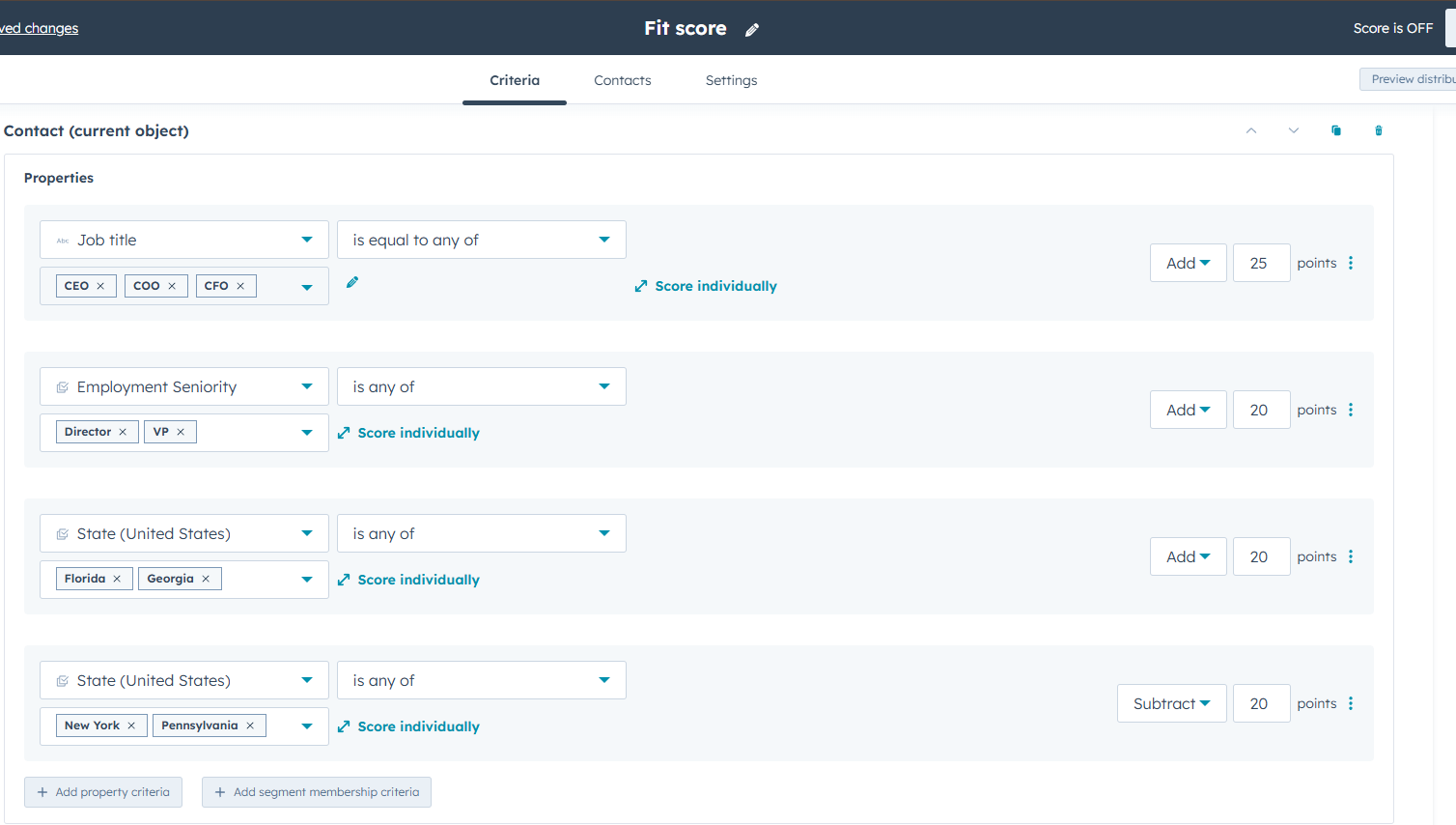
Fit Score Example:
Job Title Scoring:
- C-Level Executive: +25 points
- VP/Director: +20 points
- Manager: +10 points
- Individual Contributor: +5 points
Industry Scoring:
- Technology: +20 points
- Financial Services: +15 points
- Healthcare: +10 points
- Other: +0 points
Company Size:
- 100-500 employees: +20 points
- 500-1000 employees: +15 points
- 1000+ employees: +10 points
- <100 employees: +5 points
Location:
- Major metro areas: +10 points
- Target regions: +5 points
- Other locations: +0 points
Maximum Fit Score: 75 points
Step 4: Build Your Engagement Score
An engagement score tracks behavioral signals that indicate purchase intent and active interest. Using the same B2B SaaS company:
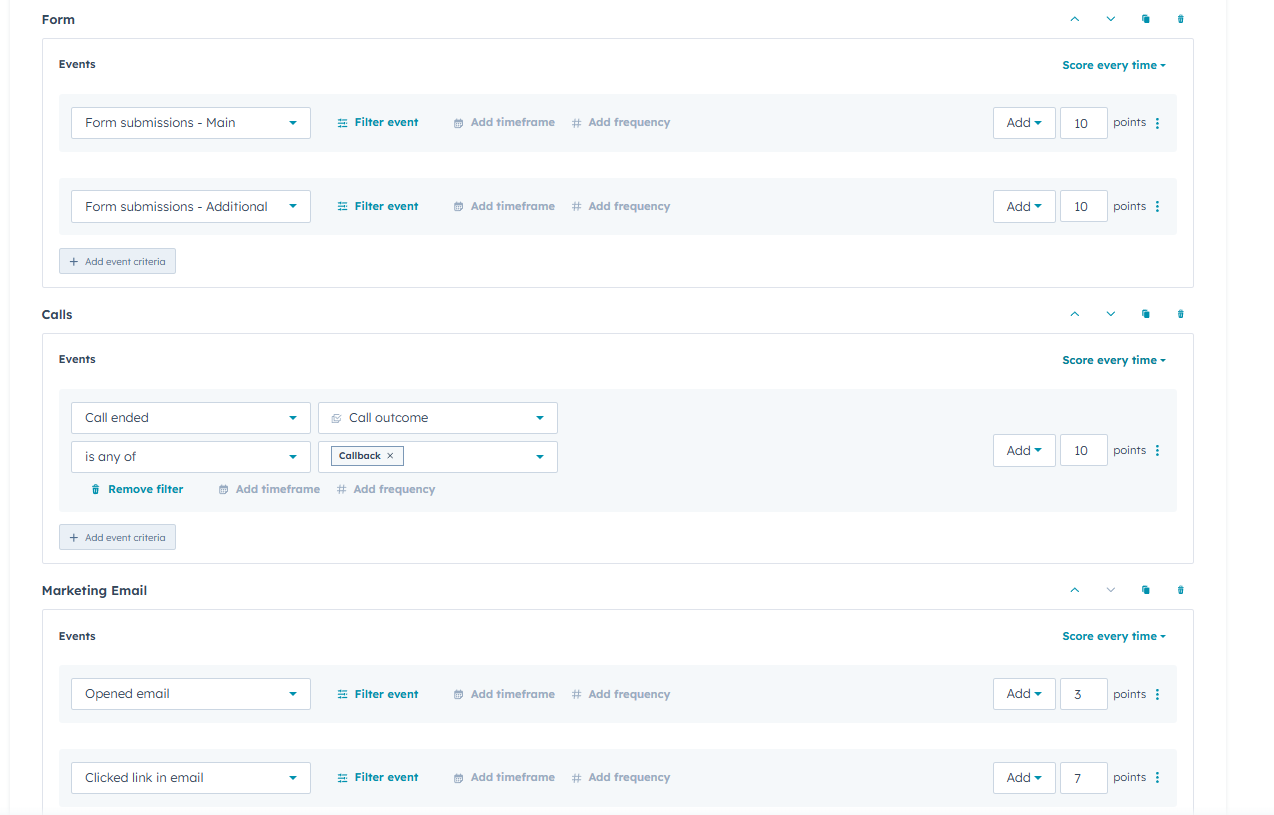
Engagement Score Example:
- Requested a demo: +30 points
- Visited pricing page: +20 points
- Downloaded a case study or whitepaper: +15 points
- Attended a webinar: +15 points
- Opened 3+ marketing emails in 30 days: +10 points
- Spent 5+ minutes on the website: +10 points
- Visited careers page: -10 points (job seeker, not buyer)
- Used free/generic email domain: -15 points
Maximum Engagement Score: 100 points
Step 5: Create Your Combined Lead Score (Optional)
Many organizations find that a combined score provides the most accurate lead prioritization. The weighting between fit and engagement should reflect your business model.
For enterprise sales with longer cycles where fit is critical, you might use a 75/25 weighting favoring fit. For product-led growth companies, a 40/60 split favoring engagement might work better.
Combined Score Formula (75/25 Fit-Weighted):
Combined Score = (Fit Score × 0.75) + (Engagement Score × 0.25)
Example Calculation:
Prospect A:
- Fit Score: 60
- Engagement Score: 40
- Combined Score = (60 × 0.75) + (40 × 0.25) = 45 + 10 = 55
Prospect B:
- Fit Score: 40
- Engagement Score: 80
- Combined Score = (40 × 0.75) + (80 × 0.25) = 30 + 20 = 50
In this scenario, Prospect A would be prioritized despite lower engagement because they more closely match your ideal customer profile, reflecting your strategic emphasis on fit over activity.
How to Set Your MQL Threshold
Once you've built your scoring model, the next critical decision is determining the threshold score that triggers a lead's transition from Lead to Marketing Qualified Lead (MQL). This threshold represents the minimum combined score a contact must achieve before being passed to sales for outreach.
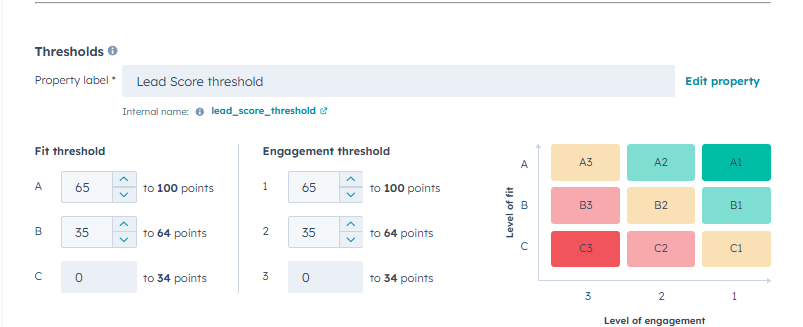
Common MQL Threshold Ranges
For a scoring model that caps at 100 points, common MQL thresholds include:
Threshold RangeApproachBest For70-80 pointsConservativeHigh sales capacity constraints; focus on only highly qualified leads50-60 pointsModerateMost B2B organizations; balances quality and volume30-40 pointsAggressiveStrong sales qualification processes; maximizes lead volume to sales
How to Determine the Right Threshold
The right threshold depends on several factors:
- Sales Capacity: How many leads can your team effectively handle?
- Conversion Rates: What percentage of MQLs typically convert to opportunities?
- Go-to-Market Strategy: Are you focused on high-touch enterprise sales or higher-volume mid-market?
- Sales Feedback: Are sales reps overwhelmed or starving for leads?
Start with a moderate threshold (50-60 points) and adjust based on feedback from your sales team and conversion data. If sales is overwhelmed with low-quality MQLs, raise the threshold. If they're starving for leads and your close rates are strong, consider lowering it.
Monitoring and Adjusting Your Threshold
Lead scoring is not a "set it and forget it" system. Review your threshold quarterly by analyzing:
- MQL-to-opportunity conversion rate
- MQL-to-customer conversion rate
- Sales team satisfaction with lead quality
- Average time to close for MQLs vs. non-MQLs
- Number of MQLs generated vs. sales capacity
If your MQL-to-opportunity rate drops below 20%, your threshold may be too low. If you're generating fewer than 20 MQLs per month but have sales capacity, your threshold may be too high.
How to Implement Lead Scoring in HubSpot
HubSpot provides a dedicated lead scoring tool that simplifies the process of building and managing your scoring models. This section provides step-by-step instructions for implementing the scoring framework outlined above.
Step 1: Access the Lead Scoring Tool
To access the lead scoring tool:
- Navigate to Settings in your HubSpot account
- Select Lead Scoring from the left sidebar menu under Data Management
The lead scoring interface allows you to create multiple score properties and define the rules that calculate those scores based on contact, company, and deal properties and activities.
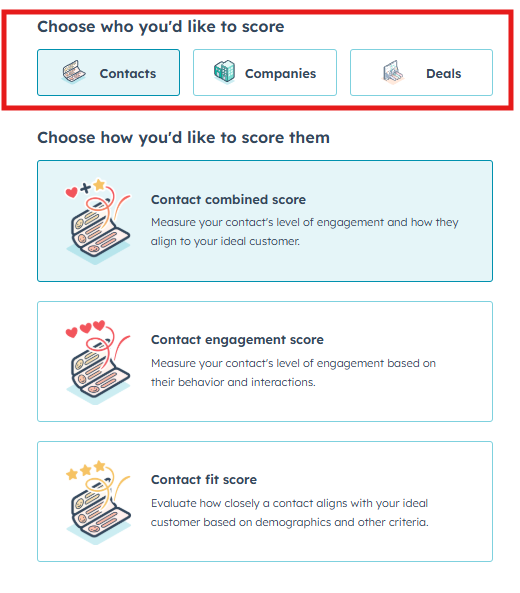
Step 2: Choose Your Scoring Object
The lead scoring tool supports scoring across three primary object types:
Object TypeUse CaseContactsScore individual people based on their demographic fit and engagement behaviorsCompaniesScore organizations based on firmographic data and aggregate activitiesDealsScore opportunities based on deal properties and associated engagement
This flexibility allows you to tailor your scoring approach to match your sales process, whether you're focused on individual contacts, account-based strategies, or pipeline prioritization.
For most B2B organizations, contact-level scoring is the starting point, with company scoring added later for account-based sales motions.
Step 3: Decide on Score Type
Within the lead scoring tool, you can choose to build:
- Fit Score: Based on demographic and firmographic attributes
- Engagement Score: Based on behavioral data and interactions
- Combined Score: Single score incorporating both dimensions
Start by creating separate Fit and Engagement score properties, then decide if you need a combined score or if your team will evaluate both scores independently.
Step 4: Configure Your Scoring Criteria
The interface allows you to define scoring criteria by selecting properties and behaviors, then assigning point values to each. The tool provides an intuitive setup where you can:
- Add criteria by selecting from contact properties, company properties, or activities
- Set conditions like "equals," "contains," "is known," etc.
- Assign point values (positive or negative)
- Add multiple rules that stack additively
Example: Building a Fit Score
Create a new score property called "Fit Score" and add these criteria:
- Job Title equals "CEO" → +25 points
- Job Title equals "VP" or "Director" → +20 points
- Job Title equals "Manager" → +10 points
- Industry equals "Technology" → +20 points
- Industry equals "Financial Services" → +15 points
- Number of Employees is between 100 and 500 → +20 points
- Country equals "United States" → +10 points
Example: Building an Engagement Score
Create a new score property called "Engagement Score" and add these criteria:
- Contact has filled out "Demo Request" form → +30 points
- Contact has visited "Pricing" page → +20 points
- Contact has downloaded any whitepaper → +15 points
- Contact has registered for any webinar → +15 points
- Marketing emails opened is greater than 3 (last 30 days) → +10 points
- Total time on all pages is greater than 5 minutes → +10 points
Step 5: Configure Negative Scoring (Optional but Recommended)
HubSpot's scoring logic supports deducting points for disqualifying characteristics. Common negative scoring rules include:
- Email domain contains competitor names → -50 points
- Email domain is free provider (gmail.com, yahoo.com) → -15 points
- Job Title contains "student" → -25 points
- Industry is "Education" (if you don't serve education) → -20 points
- Contact has unsubscribed from emails → -50 points
Negative scoring prevents unqualified contacts from reaching MQL status despite engagement activity.
Step 6: Create Combined Score Formula (Optional)
If you're using the combined scoring approach, create a calculated property:
- Go to Settings → Properties
- Create new Contact property
- Select Calculation as the field type
- Name it "Lead Score" or "Combined Score"
- Use formula:
(Fit Score * 0.75) + (Engagement Score * 0.25)
Adjust the weighting multipliers (0.75 and 0.25) based on your preferred fit vs. engagement balance.
Step 7: Set Up Lifecycle Stage Automation
Once your scoring models are configured, they automatically calculate and update in real-time as contact data changes or new behaviors are logged. To automate the Lead-to-MQL transition:
- Navigate to Automation → Workflows
- Create a contact-based workflow
- Set enrollment trigger: "Lead Score is greater than or equal to 50" (or your threshold)
- Add enrollment criteria: "Lifecycle stage is Lead"
- Add action: "Set property value" → Lifecycle stage = "Marketing Qualified Lead"
- Add optional notification to sales team
- Activate workflow
This workflow automatically promotes contacts to MQL status when they cross your defined threshold, ensuring consistent qualification criteria.
Step 8: Create Score-Based Lists and Views
To help your sales team prioritize, create filtered lists:
- High Score Leads: Lead Score ≥ 40 AND Lifecycle stage = Lead
- New MQLs: Lifecycle stage = MQL AND MQL date is within last 7 days
- Hot MQLs: Lead Score ≥ 70 AND Lifecycle stage = MQL
- Cooling MQLs: MQL date is more than 30 days ago AND Lifecycle stage = MQL
Sales reps can use these lists to focus on the highest-priority prospects first.
Step 9: Monitor and Iterate
After deployment, monitor these key metrics weekly:
- Average score by lifecycle stage
- Score distribution across your database
- MQL threshold effectiveness (% of MQLs converting to opportunities)
- Score changes over time
- Most valuable scoring criteria (which rules contribute most to conversions)
HubSpot's reporting tools allow you to create custom reports showing score distributions, lifecycle stage progressions, and correlation between scores and deal outcomes.
Frequently Asked Questions About Lead Scoring
What is a good lead score?
A good lead score depends entirely on your model's maximum value and your specific threshold settings. In a 100-point system, scores above 50 typically indicate moderate qualification, while scores above 70 suggest high qualification. The key is establishing your MQL threshold based on your sales team's capacity and your historical conversion data—there's no universal "good" score.
How often should I update my lead scoring model?
Review your lead scoring model quarterly to ensure criteria still align with your ideal customer profile and current buyer behaviors. Major updates should occur when you see significant changes in conversion patterns, launch new products, or enter new markets. Minor tweaks to point values can happen monthly based on sales feedback.
What's the difference between rule-based and predictive lead scoring?
Rule-based lead scoring uses manually defined criteria and point values that you set based on your business knowledge and historical data. Predictive lead scoring uses machine learning algorithms to analyze thousands of data points and identify patterns in your best customers, automatically calculating scores. Predictive models require significant historical data (typically 1,000+ conversions) to be effective.
Should I use one combined score or separate fit and engagement scores?
Both approaches work. Combined scores provide a single number for prioritization, which simplifies workflows and reporting. Separate scores give sales teams more nuance—they can prioritize high-fit, low-engagement contacts for targeted campaigns or high-engagement, low-fit contacts for further qualification. Most organizations start with separate scores and move to combined scoring as their process matures.
How do I prevent score inflation over time?
Implement score decay rules that reduce points for older activities. For example, deduct 10 points if a contact hasn't engaged in 90 days, or reset engagement scores quarterly. Also use negative scoring for disqualifying behaviors like unsubscribing or visiting career pages. Regular model reviews help identify if your threshold needs adjustment as overall scores trend upward.
Can I use lead scoring for account-based sales?
Yes. Create company-level scoring models that evaluate firmographic fit and aggregate activities across all contacts at an account. You can score both contacts (for individual outreach) and companies (for account prioritization) simultaneously in HubSpot. Many ABM strategies use company scores to identify target accounts and contact scores to find champions within those accounts.
What should I do if my sales team disagrees with scored leads?
Sales feedback is critical for model refinement. Schedule monthly meetings to review MQL quality and gather specific examples of good/bad MQLs. Adjust your criteria and thresholds based on their input—they understand prospect quality better than anyone. If disagreements persist, separate your scoring into fit vs. engagement so sales can prioritize using their own judgment.
How many scoring criteria should I include?
Start with 8-12 criteria total (4-6 demographic, 4-6 behavioral) and expand gradually based on data availability and team bandwidth. Too few criteria create oversimplified models that miss nuance. Too many criteria create complex models that are difficult to maintain and explain. Focus on criteria that have the strongest correlation with actual conversions.
Key Takeaways and Next Steps
Lead scoring transforms sales qualification from gut feeling to data-driven process, enabling your team to focus on prospects most likely to convert. By combining demographic fit with behavioral engagement, you create a systematic framework that consistently identifies high-quality opportunities.
Implementation Action Plan
- Week 1: Analyze your historical conversion data and identify patterns in your best customers
- Week 2: Define your ideal customer profile and key engagement milestones
- Week 3: Build your scoring criteria in HubSpot with point values based on conversion analysis
- Week 4: Set your MQL threshold and create automation workflows for lifecycle transitions
- Ongoing: Monitor weekly, gather sales feedback, and refine quarterly
Common Pitfalls to Avoid
- Don't over-complicate your model initially—start simple and add complexity as needed
- Don't set your MQL threshold without analyzing your sales team's capacity
- Don't ignore negative scoring—it's critical for filtering out unqualified traffic
- Don't skip the validation step—test your model against historical data before going live
- Don't treat scoring as static—markets change, products evolve, and models must adapt
Ready to Implement Lead Scoring?
At MergeYourData, we help B2B companies implement comprehensive lead scoring models as part of our RevOps transformation services. We specialize in:
- Data quality assessment and enrichment to ensure scoring accuracy
- Custom scoring model design based on your conversion data analysis
- HubSpot implementation and automation configuration
- Sales team training and adoption support
- Ongoing optimization and performance tracking
Contact us to discuss how lead scoring can help your team close more deals from your existing pipeline.